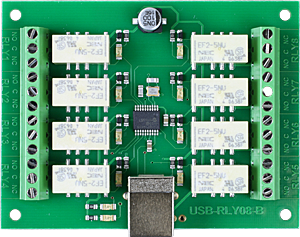
USB-RLY08B
- 8
relay outputs
Technical Documentation
Overview
The USB-RLY08B provides eight volt free contact relay outputs with a current
rating of up to 1Amp each. It is powered from any standard USB bus and has an
exceptionally low maximum current consumption of approx. 90mA with all
relays on. The relays are SPCO (Single Pole Change Over) types. The normally
open, normally closed and common pins are all available on the screw terminals.
LED indication
The USB-RLY08B provides a red LED mounted immediately next to each relay to
indicate whether it is in a powered state (LED on), there is also two LED's
which will flash with USB transactions to and from the module, green indicating
reception of data from the PC and yellow the transmission of data to the PC. Finally there is red power LED mounted on the
opposite side of the board to the USB connector.
Relay power rating
If the contact load voltage and current of the relay are in the region enclosed
by the solid and dotted lines in the figure
below, the relay can perform stable switching operation. If the relay is used at
a voltage or current exceeding this region,
the life of the contacts may be significantly shortened.

First Step - Get The Drivers
Before connecting the USB-RLY08B module, you should download
the driver and unzip it to a temporary folder. Now connect the USB-RLY08B
module and navigate windows to the temporary folder and install the driver.
The USB-RLY08B will now appear as a COM port.
Which COM port?
After installing the drivers, and plugging in the USB-RLY08B module to a spare
USB port, you will want to know which COM port it has been assigned to. This
will vary from system to system depending on how many COM ports you currently
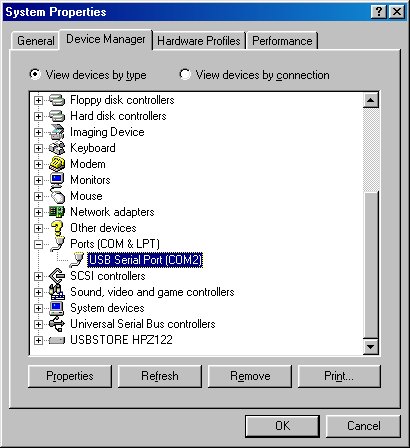
have installed. To find out where it is, right click on your "My
Computer" desktop icon and select the "Device Manager" tab. Now
scroll down and open the "Ports (COM & LPT)" tab. You should see
the USB serial port listed - COM2 in the example below. If you want to change
the COM port number - just right click on it, select properties, select advanced
and select the COM port number from the available list. The COM port default
will probably be set up for 9600 baud, 8 data bits, no parity and one stop bits,
but what ever it is just ignore it. These settings are not actually used because
we have a full 12Mbits USB connection right into the heart of the processor.
Commands
The USB-RLY08B operates with an easy to use command set as described in the table
below. Most commands are only a single byte and if applicable the USB-RLY08B will automatically
send its response. The only exception to this being the "Set relay
states" command which requires and additional desired states byte to be
sent immediately after the command byte.
| Command |
Action |
|
| dec | hex | |
| 56 | 38 | Get serial number - returns 8 bytes of ASCII that form the unique serial number for module, I.E "00001543" |
| 90 | 5A | Get software version - returns 2 bytes, the first being the Module ID which is 8, followed by the software version |
| 91 | 5B |
Get relay states - sends a single byte back to the controller, bit high meaning the corresponding relay is powered |
| 92 | 5C | Set relay states - the next single byte will set all relays states, All on = 255 (11111111) All off = 0 |
| 100 | 64 | All relays on |
| 101 | 65 | Turn relay 1 on |
| 102 | 66 | Turn relay 2 on |
| 103 | 67 | Turn relay 3 on |
| 104 | 68 | Turn relay 4 on |
| 105 | 69 | Turn relay 5 on |
| 106 | 6A | Turn relay 6 on |
| 107 | 6B | Turn relay 7 on |
| 108 | 6C | Turn relay 8 on |
| 110 | 6E | All relays off |
| 111 | 6F | Turn relay 1 off |
| 112 | 70 | Turn relay 2 off |
| 113 | 71 | Turn relay 3 off |
| 114 | 72 | Turn relay 4 off |
| 115 | 73 | Turn relay 5 off |
| 116 | 74 | Turn relay 6 off |
| 117 | 75 | Turn relay 7 off |
| 118 | 76 | Turn relay 8 off |
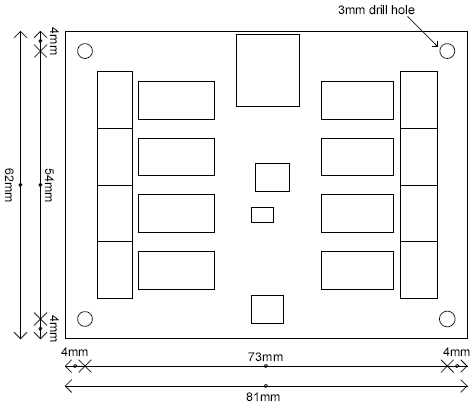
Board dimensions
Test program and example source code
To get the USB-RLY08B up and running in the minimum amount of time we have put together an example program to demonstrate the functionality of the module.

Visual studio express C# examples
The test program is available as Visual C# express ready built installation
files here, or as Visual C# express
project with source files here.
Visual studio express is provided free from Microsoft: http://www.microsoft.com/exPress/download/